AR Speech-to-Text Accessibility

AR Speech-to-Text Accessibility

Multimodal Interaction

I explored an AR speech-recognition system for deaf and hard of hearing people who need to follow both spoken content and nonverbal cues. The concept places configurable captions near each speaker and uses spatial signals to help users follow group conversations.

Duration

2024

Company

Independent Project

Role

Product Designer

Scope of work

Accessibility research, AR interaction, speech recognition, visual design, prototyping

Multimodal Interaction

I explored an AR speech-recognition system for deaf and hard of hearing people who need to follow both spoken content and nonverbal cues. The concept places configurable captions near each speaker and uses spatial signals to help users follow group conversations.

Duration

2024

Company

Independent Project

Role

Product Designer

Scope of work

Accessibility research, AR interaction, speech recognition, visual design, prototyping

Overview

Overview

Captions Without Looking Away

Phone-based transcription helps communicate spoken content, but it pulls attention away from the speaker. This concept uses augmented reality to keep captions, facial expressions, body language, and conversation context within the same field of view.

AR glasses concept displaying live transcribed speech near a person's face.

Overview

Overview

Captions Without Looking Away

Phone-based transcription helps communicate spoken content, but it pulls attention away from the speaker. This concept uses augmented reality to keep captions, facial expressions, body language, and conversation context within the same field of view.

Problem

Problem

Transcription Separates Text From the Speaker

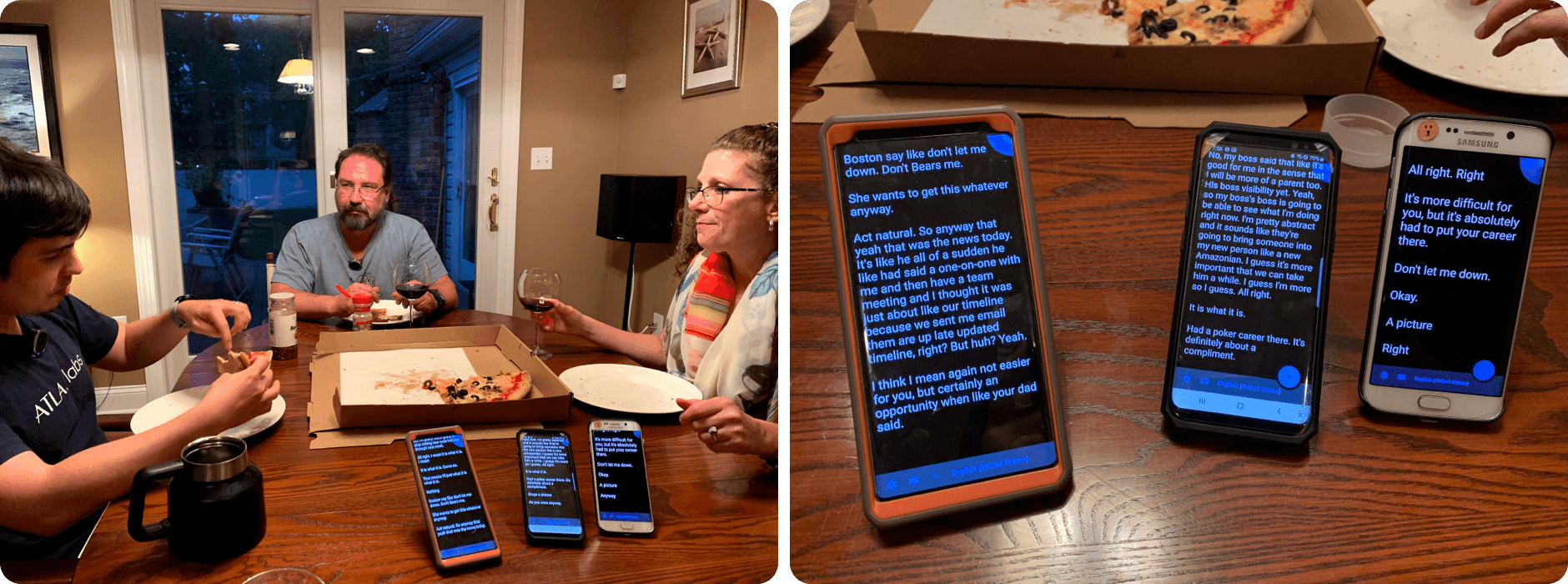
When captions appear on a phone or a separate screen, users must choose between reading the words and watching the person. That split attention makes it harder to read emotion, lip movements, and turn-taking, especially when several people are speaking.

Examples of phone transcription forcing a user to look away from people in conversation.

Problem

Problem

Transcription Separates Text From the Speaker

When captions appear on a phone or a separate screen, users must choose between reading the words and watching the person. That split attention makes it harder to read emotion, lip movements, and turn-taking, especially when several people are speaking.

Research

Research

Mapping Communication Friction

I organized first-person frustrations and existing transcription limitations into communication, situational, visual, speaker, privacy, and real-time concerns. The synthesis highlighted the importance of speaker identification, readable customization, and preserving visual context.
Research synthesis mapping pain points in speech transcription and group conversation.

Research

Research

Mapping Communication Friction

I organized first-person frustrations and existing transcription limitations into communication, situational, visual, speaker, privacy, and real-time concerns. The synthesis highlighted the importance of speaker identification, readable customization, and preserving visual context.

Approach

Approach

Supporting Lip Reading and Group Conversation

Lip reading and context clues are central to many conversations, but mouth shapes vary and group discussions are difficult to track. The concept anchors text to the active speaker so users can connect language, facial expression, and speaker location more directly.

Solution framework connecting lip reading, speaker context, and AR captions.

Approach

Approach

Supporting Lip Reading and Group Conversation

Lip reading and context clues are central to many conversations, but mouth shapes vary and group discussions are difficult to track. The concept anchors text to the active speaker so users can connect language, facial expression, and speaker location more directly.

Caption Placement

Caption Placement

Putting Text Near the Speaker's Lips

Placing captions directly below a speaker’s mouth reduces the distance between reading and lip observation. It also supports language learning by making it easier to connect the visible mouth shape with the spoken phrase and its translation.

Caption placement studies showing text positioned directly below a speaker's mouth.

Caption Placement

Caption Placement

Putting Text Near the Speaker's Lips

Placing captions directly below a speaker’s mouth reduces the distance between reading and lip observation. It also supports language learning by making it easier to connect the visible mouth shape with the spoken phrase and its translation.

Customization

Customization

Adapting Captions to the User

The setup flow previews changes as users adjust text size, shape, color, line count, placement, scrolling, and hardware options. The goal is to let each person create a readable configuration independently before entering a live conversation.
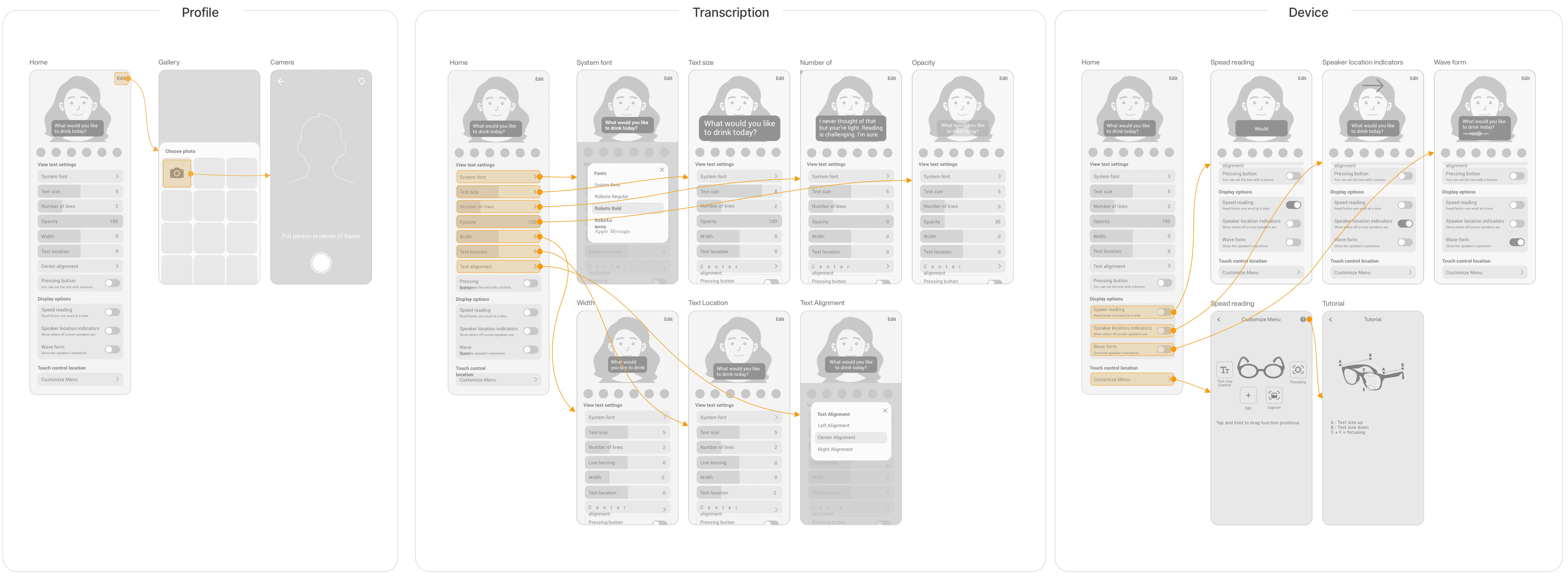
Wireframes for customizing AR caption size, color, position, line count, and scrolling.

Customization

Customization

Adapting Captions to the User

The setup flow previews changes as users adjust text size, shape, color, line count, placement, scrolling, and hardware options. The goal is to let each person create a readable configuration independently before entering a live conversation.

Spatial Interaction

Spatial Interaction

Following Speakers Around the Room

Captions appear near the active speaker, while directional arrows indicate when someone is outside the user’s field of view. As the user turns, the text card resolves into position near that speaker, making group conversation easier to follow in real time.

AR conversation flow with captions anchored to speakers and arrows pointing toward off-screen voices.

Spatial Interaction

Spatial Interaction

Following Speakers Around the Room

Captions appear near the active speaker, while directional arrows indicate when someone is outside the user’s field of view. As the user turns, the text card resolves into position near that speaker, making group conversation easier to follow in real time.